
FAQ
Here in the Qvantum FAQ, you will find the most common questions about our heat pumps. For more information about how our products work, check the relevant product page where you will also find product sheets and installation manuals.
The videos available here in the Qvantum FAQ can also be found on our YouTube channel.
Qvantum APP
- Where can I find the Qvantum App?
- How does the Qvantum App work?
- How do I add users in the Qvantum App?
- Can multiple users use the same heat pump in the app?
- How can I control and monitor my heat pump when I am not at home?
- Can multiple users use the same heat pump in the app?
General & Service
- I am having problems with my heat pump, how can I get help/service?
- I am having problems with my ETK heat pump, how can I get help/service?
- How do I replace the filter?
- What service/maintenance do I need to perform on my heat pump?
- Where can I find my serial number?
Warranty
- What warranty do I have on my heat pump?
- How can I check if my heat pump has safety insurance?
- Who should I contact if my heat pump breaks down during the warranty period?
Other
Technology & Features
- How do I activate/changer WiFi?
- How do I get more hot water capacity?
- Why am I not getting any hot water?
- How do I schedule vacation/away mode?
- What is Scheduling in the Qvantum app?
- How does Scheduling work in practice?
- How can I see that a schedule is active?
- Can Qvantum heat pumps handle quarter-hour/hourly electricity pricing (Nord Pool) and plan operation based on price peaks?
- What is SmartControl and how does it work?
- Do your heat pumps have strong IT security against ransomware attacks, for example?
- Do I need a room sensor?
- Which heating curve should I use?
- What happens if the power goes out?
- What does the alarm mean?
- How do I update my heat pump and ensure I have the latest software?
- It is summer, how do I turn off heating production?
- Do I need to make any settings changes before the winter season?
- I am going to fill my large bathtub/jacuzzi, how do I get more hot water?
- How do I check the system pressure in the distribution system?
- How do I bleed the tank?
- Is the tank stainless steel?
- What is the “lump” attached to the back of my QA?
- Can my QE exhaust air heat pump produce cooling?
- What does the installation process for a QE look like?
Here you can find the Qvantum App


How does the Qvantum App work?
Please note that to get full functionality and all security updates, you should always update the app to the latest version. Features may vary depending on the type of heat pump and the country you are in.
How do I add users in the Qvantum App?
How can I control and monitor my heat pump when I am not at home?
With the Qvantum App on your mobile phone, you can monitor your heat pump remotely. Read more here in the FAQ or on App-sidan.
Can multiple users use the same heat pump in the app?
I am having problems with my heat pump, how can I get help/service?

First, contact your installer for service. If they cannot help you for any reason, or if you do not know who installed your heat pump, we can ask one of our authorized service partners for assistance, as we have good coverage across Sweden.
If you do not know which company to contact, you are welcome to contact Qvantum Support.
I am having problems with my ETK heat pump, how can I get help?
First, contact your installer. If you do not know which company to contact, you are welcome to contact us via Qvantum Support.
Before contacting your installer, you can read through our troubleshooting document to see if it can resolve your problems.
How to replace the filter in your Qvantum heat pump
The filters in the QE need to be replaced regularly. The filter cassettes are accessed by removing the front panel of the ventilation unit. Replace both filters at the same time.
NOTE! The product must be switched off before the filter cassettes are removed and remain switched off until the replacement is completely finished!
- Turn off the ventilation.
- Lift off the front panel and pull out the ventilation cassette.
- Remove the retaining plate from the filter cassette.
- Remove and replace the used filter.
- Reinstall the retaining plate and put the ventilation cassette back in.
- Reattach the front panel
- Turn the ventilation back on.
What service/maintenance do I need to perform on my heat pump?
As a rule, you need to do very little. If it is an exhaust air heat pump then as a consumer you only need to replace the filter regularly (approx. every 6 months). If you have an air-to-water heat pump we recommend that you clean the outdoor unit from leaves and debris that can get stuck on the evaporator.
NOTE! Be very careful with the fin pack on the back of the outdoor unit. The fins are made of aluminium and bend very easily.
Where can I find my serial number?
You can find the serial number under device information on the display or on the cover of the electrical box behind the front hatch.
You can also see the serial numbers of connected devices in the app. You will find them under “Product information” in the menu.
What warranty do I have on my heat pump?
We provide a three-year product warranty on all our heat pumps, valid from the installation date. A six-year safety insurance policy is also included and can be extended over time.
To activate the warranty and insurance, your installer must register your heat pump (this is done through the app during installation). The warranty and insurance apply to heat pumps delivered and installed in Sweden.
Read more on the Warranty page for more information.
How can I check if my heat pump has safety insurance?
Go to Arctic, which provides Qvantum’s safety insurance, and search using your serial number: Click here.
Who should I contact if my heat pump breaks down during the warranty period?
As the owner of the heat pump, you should first contact your installer or house manufacturer for an assessment of the fault. The installer/house manufacturer reports to Qvantum if the issue is covered by the warranty.
If the installer is no longer available, Qvantum should be contacted for information about the nearest service representative that the customer can contact. The reseller is always responsible toward the end customer. This also applies when a fault report has been submitted to Qvantum or to Qvantum’s service representative.
How to activate/change WiFi
Make sure the heat pump is installed and running. Download the Qvantum app to your mobile phone and connect to your heat pump if you have not already done so.
Read more about how the app works.
Connect to the heat pump via Bluetooth
- Open the app and scan the QR code on the heat pump display.
- The app will automatically connect to the heat pump via Bluetooth.
NOTE! Make sure Bluetooth is enabled on your mobile phone when making these settings.
Connect to your WiFi
- Open the Qvantum app and tap the gear icon in the upper left corner of the card.
- Tap “WiFi (Requires Bluetooth)” (the customer needs to be near their heat pump).
- Select your network. If it does not appear in the list, select “Retrieve networks”.
Done! Your heat pump is now connected to your WiFi network.

How do I get more hot water capacity?
Why am I not getting any hot water?
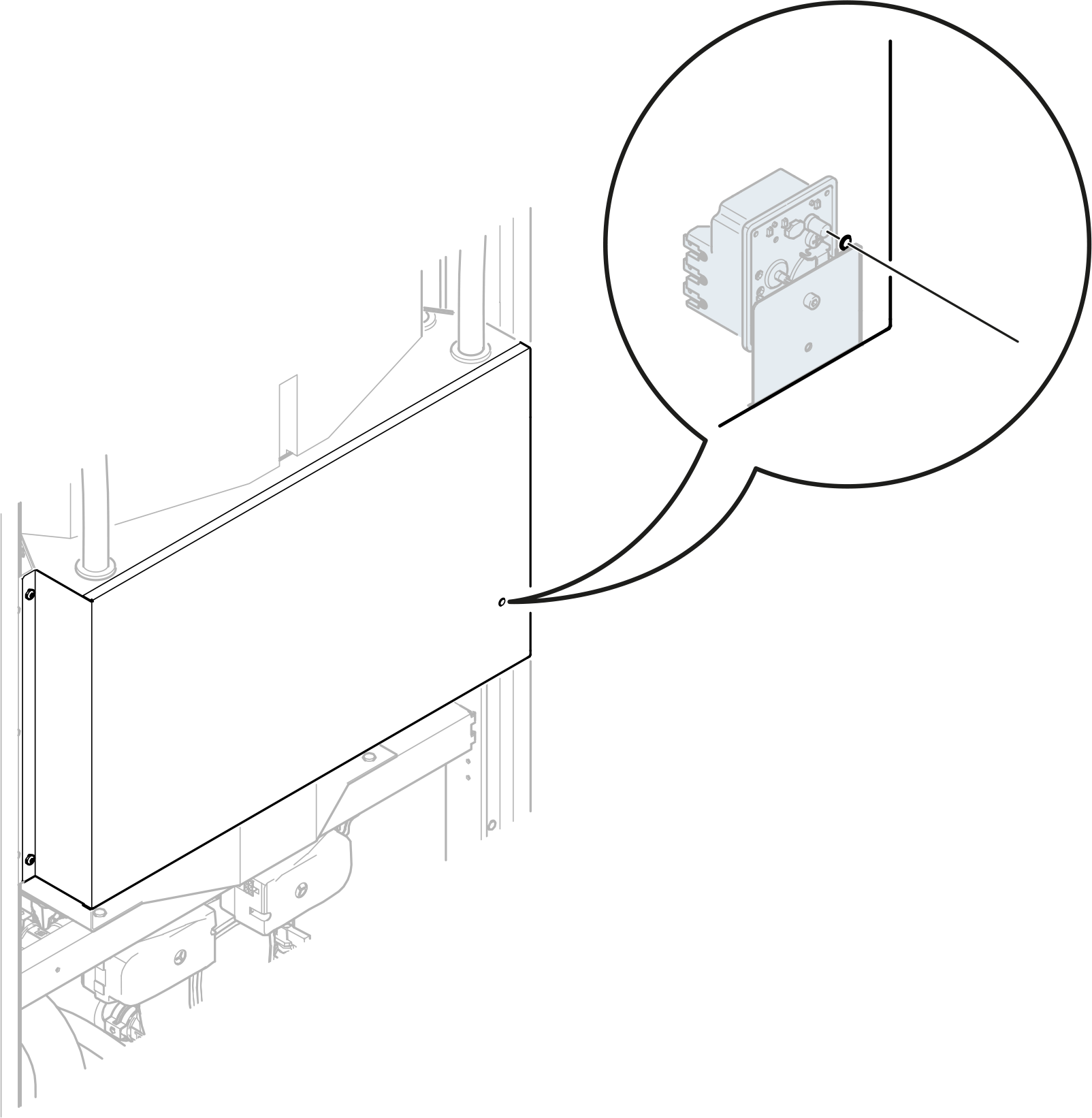
The unit is equipped with overheating protection located behind the front panel of the electrical box. The overheating thermostat cuts power to the electric heater if the temperature exceeds 95°C
NOTE Make sure the overheating protection has not tripped before installation.
A manual reset is required if the overheating protection has tripped. The overheating protection is reset by pressing the button that can be reached through a hole in the front panel of the electrical box.
How do I schedule vacation/away mode
What is “Scheduling” in the Qvantum app?
You will find the function in Device settings under the gear icon.
How does Scheduling work in practice?
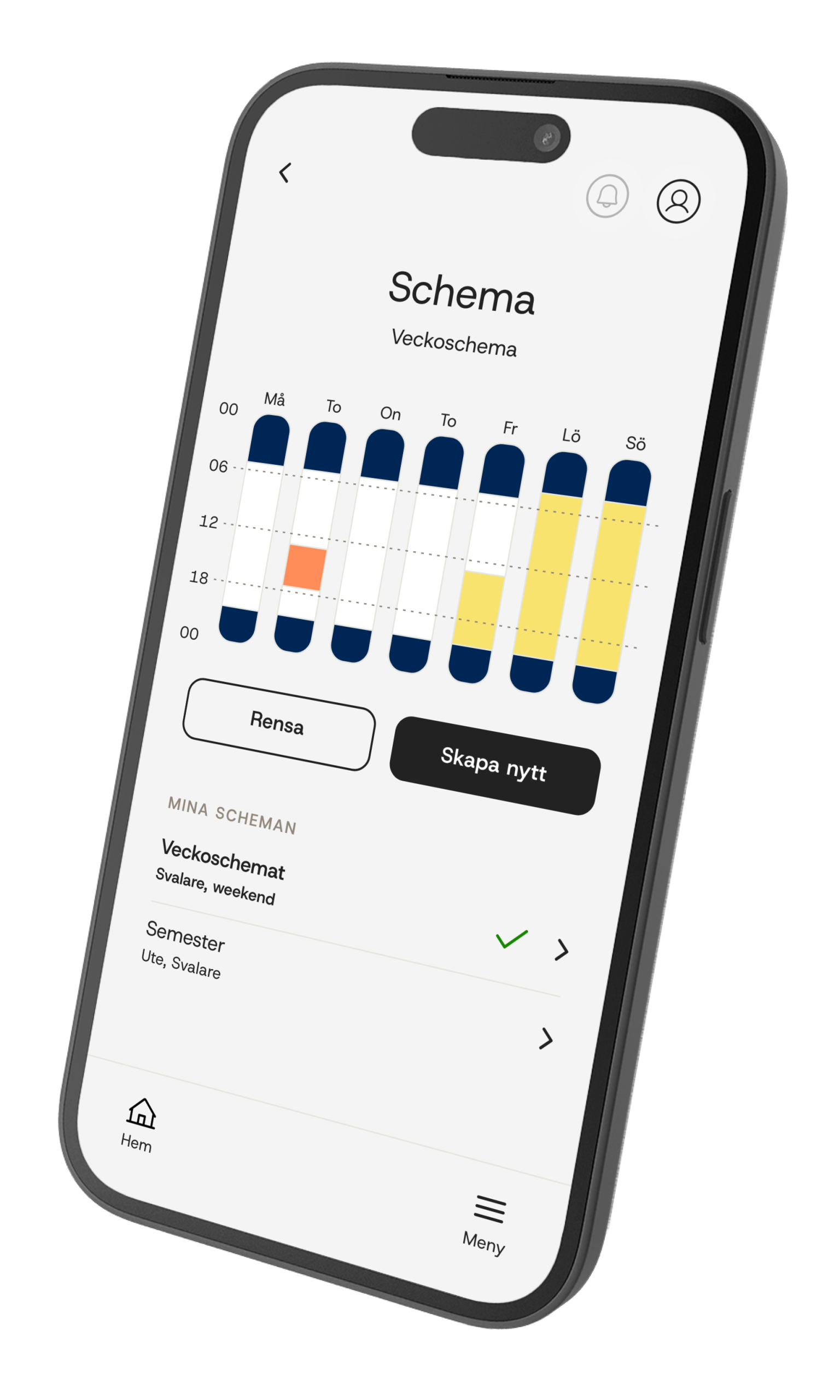
Heating
Adjust the temperature at different times. Let the system work more actively in the morning when the house is in use, and lower it when demand is lower, for example at night or when no one is home.
Hot water
Adjust capacity in several levels so that more hot water is produced when demand is high, such as in the morning and evening, and less when demand is lower.
Extra hot water
Activate for temporary increased demand, for example when several showers are taken one after another. It can also be scheduled so extra capacity is ready in advance.
Electric heater
Limit the output between 1–5 kW for better control over energy use and to avoid unnecessary power peaks.
Ventilation (QE)
Schedule extra ventilation or reduced ventilation. Increase ventilation when the house is full of guests, or reduce it in the evening for a calmer indoor environment with lower noise levels.
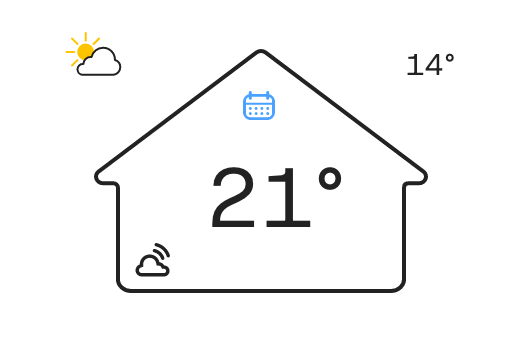
How can I see that a schedule is active?
Can Qvantum heat pumps handle quarter-hour/hourly electricity pricing (Nord Pool) and plan operation based on price peaks?
Yes, we call it “SmartControl” (see below). If you have an electricity contract with quarter-hour/hourly pricing, there is an opportunity to save money when electricity prices are low. You can find and activate the function via the app’s overview. Swipe to “SmartControl” or select it under device settings (found under the gear icon on the home card).
Note that you must update the app to the latest version to find the function.
What is Smart Control and how does it work?
SmartControl is our tool for optimizing your heat pump operation against hourly/quarter-hourly prices.
You activate the function via the Qvantum App (Smart Control is found under the gear icon on the home card) or on the display of your heat pump.
How does it work?
Electricity prices are loaded in advance from Nord Pool and used in the SmartControl algorithm. The basic logic is to try to avoid using the heat pump during periods with high relative prices during the day, and instead charge heating and hot water during periods with lower prices.
There is one algorithm for heating operation and one for hot water operation.
What is the difference between Eco, Balanced and Comfort?
Eco is the most economically “aggressive” mode and tries to avoid high prices as much as possible.
Balanced is exactly what it sounds like: the middle level where both price and comfort are part of the algorithm.
Comfort focuses more on comfort and slightly less on price.

Do your heat pumps have strong IT security against ransomware attacks, for example?
Our software is based on the principle of “Security by design”, which means that no access keys to the pump are available unless the user has given permission.
The pumps can operate without problems even if Qvantum were to be affected by ransomware.
To maintain security and improve functionality, the pumps update continuously.
Do I need a room sensor?
No, you do not have to have one, but it is beneficial to connect it because the temperature can be more accurate.
Which heating curve should I use?
It depends on your property, the system and where in the country you are located. Enter the DUT for your area and the supply temperature your property and system require at DUT temperature.
This is set by the installer during installation, but subsequent adjustment may be needed.
What happens if the power goes out?
The heat pump stops and restarts automatically when the power comes back. Unfortunately, hot water is not available during a power outage.
What does the alarm mean?
Do you want to know what different alarms in the heat pump mean? Here you will find a complete alarm list with all alarm codes and what they mean.
How do I update my heat pump and ensure that I have the latest software?
The heat pump must be connected to WiFi, and updates then take place automatically. When Qvantum has made improvements or added new features, these updates are sent directly to your heat pump.
It is summer, how do I turn off heating production?
It automatically enters summer mode if operating mode Auto is selected.
Do I need to make any settings changes on my heat pump before the winter season?
No, you normally do not need to make any settings at all. If you feel that it is too cold, you can adjust the heating curve or its offset via the app.
I am going to fill my large bathtub/jacuzzi, how do I get more hot water?
On the heat pump display or in the app, you can choose to activate Extra hot water for 4 or 8 hours. Remember to activate it in good time so that the heat pump has time to heat the water before you need it.
How do I check the pressure in the distribution system?
To ensure functioning heating, it is important to have the correct pressure in the distribution system. The pressure should be approximately 1–1.5 bar. The video below shows how you can view and change the pressure.
How do I bleed the tank?
To ensure functioning heating/hot water, it is important to bleed the tank, which may need to be done from time to time, especially before the winter season. The videos below show how to bleed the tank on Qvantum QE and Qvantum QH respectively.
Is the tank stainless steel?
The tank is an integrated buffer tank that only stores heating water that goes to your radiators (i.e. not domestic hot water). Hot water production takes place via a domestic hot water heat exchanger, which minimizes the risk of legionella. This provides universal corrosion protection as long as the recommended tap water quality is followed.
What is the “lump” attached to the back of my QA?
It is a safety device that ensures the pressure in your home’s heating system does not become too high.
Can my QE exhaust air heat pump produce cooling?
No, at present it cannot produce cooling.
What does the installation process for a QE look like?
In the videos below, you can see what the installation process for Qvantum QE looks like. The video is primarily suitable for installers.
The first video shows how an installation should be carried out in practice. The second shows the flow in the app.
What is a heating curve?
The supply temperature your system needs at DUT (design outdoor temperature). This supply temperature is then lowered according to the curve as the outdoor temperature rises.
What is DUT?
DUT stands for design outdoor temperature and indicates the outdoor temperature your area normally has on the coldest day of the year. Developed by Boverket.
What do the abbreviations mean?

Tank unit
A = Electric heater
B = Hot water heat exchanger
BT10 Condenser out
BT11 Supply line
BT13 Condenser in
BT30 Tank temperature
BT31 Primary side DHW exchanger
BT33 Cold water in
BT34 Hot water out
GP1 Circulation pump heating system
GP2 Charge pump hot water
BF1 Flow sensor
QM Diverter valve
QN Shunt valve

Compressor unit
A = Fan
B = Compressor
C = Evaporator
D = Condenser
BT10 Condenser out
BT13 Condenser in
BT14 Room air in
BT15 Exhaust air
BT20 Hot gas
BT21 Liquid line
BT22 Evaporator in
BT23 Suction gas line
BP1 Low-pressure sensor
BP2 High-pressure sensor
QM1 Four-way valve
QN1 Expansion valve
What does flexready mean®?
All of Qvantum’s new heat pumps for villas are prepared for what is called flexready®. This means they are designed to turn fluctuations in the electricity market to customers’ advantage.

How does Qvantum handle my personal data?
Does the heat pump have an API?
Where can I find your release notes?
App-specific release notes are also available on App Store or Google Play.


